
Gradle依赖管理
Gradle依赖管理
仓库配置
Gradle支持引入公共仓库和自定义仓库。
Gradle相关接口提供了快捷方式来声明Maven Central,即通过调用mavenCentral()方法:
repositories {
    mavenCentral()
}
关于多个仓库的读取顺序问题
本地依赖缓存
Gradle会自动下载你所需要的依赖,并将它们存储在本地缓存中,后续的构建将重用这些依赖。
如果远程仓库变动了,Gradle通过比较本地和远程的校验来检测依赖是否发生变化,不仅如此,Gradle还会通过其他措施来校验依赖是否变化,可靠性更强。
Configuration
我们知道,依赖是和使用场景相关的,例如,junit只在测试的时候才会使用,mysql-connector只在运行时需要,编译时不需要,servlet-api只在编译期用到,运行时会由容器提供。
所以,在Maven中,我们可以定义依赖的scope,例如compile、provided、runtime、test等,例如:
<dependency>
    <groupId>mysql</groupId>
    <artifactId>mysql-connector-java</artifactId>
    <scope>runtime</scope>
    <version>8.0.17</version>
</dependency>
在Gradle中,通过Configuration来描述一个scope中的所有依赖,Configuration也是一个领域对象。
Java插件就引入了很多个Configuration:
- implementation
- compileOnly
- compileClasspath
- annotationProcessor
- runtimeOnly
- runtimeClasspath
- ...(test相关)
例如,下面是Java插件一些主要的Configuration:
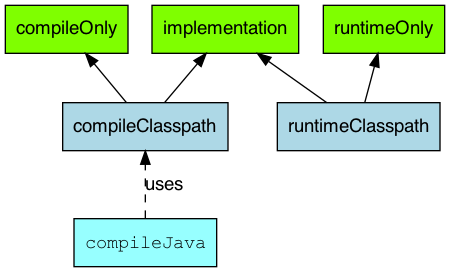
Java插件引入的Configuration比起Maven的scope,粒度要更细。
注意:
In Gradle 7, both the
compileandruntimeconfigurations are removed. Therefore, you have to migrate to theimplementationandapiconfigurations above. If you are still using thejavaplugin for a Java library, you will need to apply thejava-libraryplugin instead.
在Gradle7+版本中,compile Configuration被移除了,应该使用implementation或api来代替。其中, api Configuration由Java Library插件引入(Java插件的升级版,JVM应用推荐使用),Java Library插件引入的主要Configuration如下图:
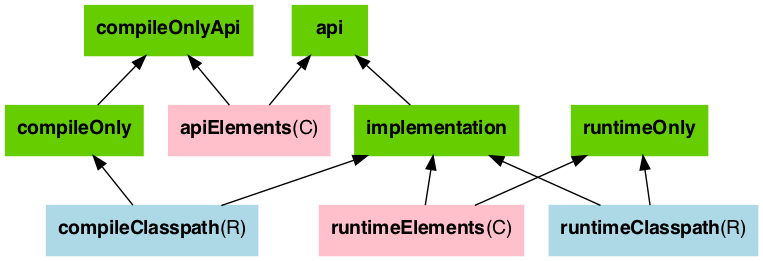
- 绿色指的是依赖可以被声明的类型
- 粉色是指一个组件编译所需或运行时所需的库
- 蓝色是组件自己内部使用的
api vs implementation
这里是Gradle中比较难理解的一个点,很多博客写的不太清晰,这里解释一下:
- 如果一个依赖被声明为api,那么该模块的消费者的compile和runtime中都会出现该依赖
- 如果一个依赖被声明为implementation,那么该模块的消费者的compile中不会出现该依赖,只有runtime中都会出现该依赖
下面,我们用例子来说明:
有两个gradle子模块,sub-a和sub-b,其中sub-a依赖了sub-b。
sub-a的build.gradle:
...

dependencies {
    implementation project(':sub-b')
}
sub-b的build.gradle:
...

dependencies {
    implementation 'cn.hutool:hutool-all:5.8.10'
}
sub-b模块引入了该依赖,所以如下代码正常编写:
System.out.println(cn.hutool.core.date.DateUtil.date());
但是,同样的语句,在sub-a模块中,IDE就会报错,也就是说编译期找不到依赖。
查看sub-a模块的依赖:
$ gradle :sub-a:dependencies
...
compileClasspath - Compile classpath for source set 'main'.
\--- project :sub-b

runtimeClasspath - Runtime classpath of source set 'main'.
\--- project :sub-b
     \--- cn.hutool:hutool-all:5.8.10
...
那么,我们将sub-b的build.gradle修改为如下:
...

dependencies {
    // implementation 'cn.hutool:hutool-all:5.8.10'
    api 'cn.hutool:hutool-all:5.8.10'
}
我们发现,sub-a模块中的如下语句不再编译报错了:
System.out.println(cn.hutool.core.date.DateUtil.date());
再次查看sub-a的依赖:
$ gradle :sub-a:dependencies
...
compileClasspath - Compile classpath for source set 'main'.
\--- project :sub-b
     \--- cn.hutool:hutool-all:5.8.10

runtimeClasspath - Runtime classpath of source set 'main'.
\--- project :sub-b
     \--- cn.hutool:hutool-all:5.8.10
...
我们平时引用依赖的时候,发现api和implementation区别不大的原因是,大部分依赖在Maven中声明的Scope都是compile。
最佳实践
那么平时,我们应使用api还是implementation,如果该依赖是该模块的内部依赖,则使用implementation,如果该依赖是该模块导出的一部分,则应该使用api。
更多的可以参考该文章,How to use Gradle api vs. implementation dependencies with the Java Library plugin。
annotationProcessor
Annotation processing是Java在1.5新增的编译选项,如下:
javac --processor-path path
此选项会去寻找一个继承自AbstractProcessor的类,生成指定的代码。
如下所示:
//lombok
compileOnly 'org.projectlombok:lombok:1.18.10'
annotationProcessor 'org.projectlombok:lombok:1.18.10'
annotationProcessor的作用就是定义了传递给javac --processor-path的依赖。
依赖报告
-
对于没有模块的:
gradle dependencies -
有模块的(app为你的模块名)
gradle app:dependencies参数:
--configuration选择查看哪个configuration
例如:查看upm模块,compile的
$ gradle :upms:dependencies --configuration compile
> Task :upms:dependencies

------------------------------------------------------------
Project :upms
------------------------------------------------------------

compile - Dependencies for source set 'main' (deprecated, use 'implementation' instead).
+--- org.mybatis.spring.boot:mybatis-spring-boot-starter:2.1.0
|    +--- org.springframework.boot:spring-boot-starter:2.1.6.RELEASE (*)
|    +--- org.springframework.boot:spring-boot-starter-jdbc:2.1.6.RELEASE (*)
|    +--- org.mybatis.spring.boot:mybatis-spring-boot-autoconfigure:2.1.0
|    |    \--- org.springframework.boot:spring-boot-autoconfigure:2.1.6.RELEASE (*)
|    +--- org.mybatis:mybatis:3.5.2
|    \--- org.mybatis:mybatis-spring:2.0.2
+--- org.mybatis.generator:mybatis-generator-core:1.3.3 -> 1.3.7
\--- org.mybatis.generator:mybatis-generator-maven-plugin:1.3.7
     +--- org.apache.maven:maven-plugin-api:3.5.4
     |    +--- org.apache.maven:maven-model:3.5.4
     |    |    +--- org.codehaus.plexus:plexus-utils:3.1.0
     |    |    \--- org.apache.commons:commons-lang3:3.5
     |    +--- org.apache.maven:maven-artifact:3.5.4
     |    |    +--- org.codehaus.plexus:plexus-utils:3.1.0
     |    |    \--- org.apache.commons:commons-lang3:3.5
     |    +--- org.eclipse.sisu:org.eclipse.sisu.plexus:0.3.3
     |    |    +--- javax.enterprise:cdi-api:1.0
     |    |    |    +--- javax.annotation:jsr250-api:1.0
     |    |    |    \--- javax.inject:javax.inject:1
     |    |    +--- org.eclipse.sisu:org.eclipse.sisu.inject:0.3.3
     |    |    +--- org.codehaus.plexus:plexus-component-annotations:1.5.5
     |    |    +--- org.codehaus.plexus:plexus-classworlds:2.5.2
     |    |    \--- org.codehaus.plexus:plexus-utils:3.0.17 -> 3.1.0
     |    +--- org.codehaus.plexus:plexus-utils:3.1.0
     |    \--- org.codehaus.plexus:plexus-classworlds:2.5.2
     \--- org.mybatis.generator:mybatis-generator-core:1.3.7

(*) - dependencies omitted (listed previously)

A web-based, searchable dependency report is available by adding the --scan option.

BUILD SUCCESSFUL in 0s
1 actionable task: 1 executed
注意:
-
(c)dependency constraint 依赖约束
-
(*)此依赖被排除了,依赖管理器选择了相同的或者另一个版本的类库
-
针对版本冲突Gradle的策略是获取最新的版本
dependencyInsight
Gradle还提供了不同类型的报告:
dependencyInsight(观察报告),它解释了依赖是如何被选择的,以及为什么。
参数:
-
--dependency <dependency>依赖名称,必选参数,可以是完整的格式,
group:name,或者是他的一部分,如果匹配到了多个依赖,都会进行展示。 -
--configuration <name>配置名称,默认是compile
例如:
$ gradle :upms:dependencyInsight --dependency javax.inject:javax.inject   --configuration compile

> Task :upms:dependencyInsight
javax.inject:javax.inject:1
   variant "runtime" [
      org.gradle.status = release (not requested)
   ]

javax.inject:javax.inject:1
\--- javax.enterprise:cdi-api:1.0
     \--- org.eclipse.sisu:org.eclipse.sisu.plexus:0.3.3
          \--- org.apache.maven:maven-plugin-api:3.5.4
               \--- org.mybatis.generator:mybatis-generator-maven-plugin:1.3.7
                    \--- compile

A web-based, searchable dependency report is available by adding the --scan option.

BUILD SUCCESSFUL in 0s
1 actionable task: 1 executed
注意:
- dependencyInsight报告展示的依赖树是从特定依赖到配置的
强制指定依赖版本
configurations.cargo.reso1utionStrategy {
    force 'org.codehaus.cargo:cargo-ant:l.3.0'
}
排除依赖
implementation("io.springfox:springfox-swagger2:2.9.2") {
    exclude group: "org.slf4j", module: "slf4j-api"
}
注意:
- version属性是不可用的
References
- 博客:Annotation processors in Gradle with the annotationProcessor dependency configuration
- Gradle官方文档:Declaring dependencies
- Gradle官方文档:The Java Plugin-Dependency management
- Gradle官方文档:The Java Library Plugin
- Gradle官方文档:Upgrading your build from Gradle 6.x to 7.0-configuration_removal
- 博客:How to use Gradle api vs. implementation dependencies with the Java Library plugin
评论 (0)
登录后即可发表评论